Old phone, new home surveillance system
AlfredCamera review: Taking advantage of free mobile surveillance apps
This post is part of a series entitled “BlackTechLogy.” Click here for the archived posts.
Writer’s note: Updates have been made on this post after buying the software perks on Tuesday, May 3, to compare the free version versus the paid version.
I’ve never been someone who rushes out of the door whenever a new smartphone comes out. I like new technology, but I like paying my mortgage on time far more. However, I am a sucker for a promo deal. Considering I’m anti-cable (and despise Xfinity), anything that’ll get me free video streaming memberships will win me over. Additionally, bonus phone numbers (or free phone number changes) and free smartphone promos will always get my attention. The problem with my coupon-loving, marketing promo-following fandom is I end up with more phones than phone numbers.
Up until today, I’ve always donated old smartphones to ecoATM machines. For me, there is no downside to getting a few dollars for a phone that would’ve collected dust in my closet. I’m also a tree hugger who is as enthusiastic about sustainability as I am promo deals.
ADVERTISEMENT ~ Amazon
As an Amazon affiliate, I earn a percentage from purchases with my referral links. I prioritize featuring intriguing products from small businesses, women-owned businesses and Black-owned businesses. All five of my Substack publications include a MINIMUM of one product sold by a VERIFIED Black-owned business.

This week though, there was something else on my mind — a neighbor on our block who was randomly cutting people’s “Keep Off the Grass” signs in half. Not only was he doing this painfully childish antic, but he’d stolen a set of garden fence pieces that were protecting an area of grass constantly trampled on by cigarette litterers and pedestrians (who are allergic to sidewalks).
Recommended Read: “Private surveillance cameras and pleasing the neighbors ~ Know your state laws before placing cameras in multi-unit buildings”
He stole our fencing once and then threw it in the mulch with the sign. Then he took it again — and I haven’t seen it since. While I’m 99.9% sure of who is doing it, how can I prove it, especially if the neighbor is familiar with our multi-camera system and where not to stand? Although I’ve already begrudgingly admitted I’ve become the “grumpy old man” on my block, yelling at people to stay off the grass, I shrugged my shoulders at these antics. Was it really worth it to pick a fight over fence pieces and yard signs? For me, not really.
ADVERTISEMENT ~ Amazon
As an Amazon Affiliate, I earn a percentage for every purchase with my referral links.

However, it started to bother me that someone could be that close to my entrance and exit doors, along with my windows and front yard, and I’d be none the wiser about what was going on. Sure, there are surveillance cameras around the building, but who wants to spend hundreds of dollars on every single inch of the property? I’d already paid for one camera (along with several others that the condo board is in charge of watching), but I had no desire to keep shelling out money for more. Plus, I liked my window setup—with pretty flowers instead of a bulky surveillance camera.
That is, until I remembered those extra smartphones that I never use. Something clicked. I looked from the flowers in my windows, the closet with old smartphones and then my calendar. Folks, it is 2022, not 1982 — and mobile apps are filled with free surveillance camera mobile apps. If you have a smartphone you’re not using, then you have a free surveillance video camera just waiting to be set up.
How to set up mobile app surveillance
A search online will bring up plenty of options for free mobile app surveillance options. Mobile apps like Ivideon took so long to scan the QR code that I gave up altogether. Although I didn’t check out any of the “8 Best free Wi-Fi camera apps for monitoring home security on desktops – 2019,” I kept noticing the high ratings for another mobile app: AlfredCamera Home Security. (A 4.8 out of 5.0 score from 516,902 is a helluva rating, especially when people are more likely to leave ratings just to complain.)
Within a few minutes after using AlfredCamera, I’d set up my smartphones, using one on “Viewer” mode and the other on “Camera” mode. While there are premium options to avoid constant video clips of moving cars, leaves blowing in the wind, birds flying or other nonsensical things that do not require surveillance footage, the free video option auto-deletes in seven days if you opt out of paying. (I decided to just delete “waste” videos every time I walk my dog so I can keep tabs on valid video footage. By me walking her several times a day, I don’t expect to be overwhelmed with unnecessary video footage.)
Recommended Read: “14 ways to make the best use of laptops that aren't compatible with Windows 11 ~ Donating to schools or cash-strapped students are two ways to reuse old computers, but here are other options”
And unlike other surveillance cameras, with mobile surveillance apps, homeowners (or tenants) don’t have to worry about cameras freezing up during the winter months when they need to be recharged. There are no brackets or screws or shelves needed.
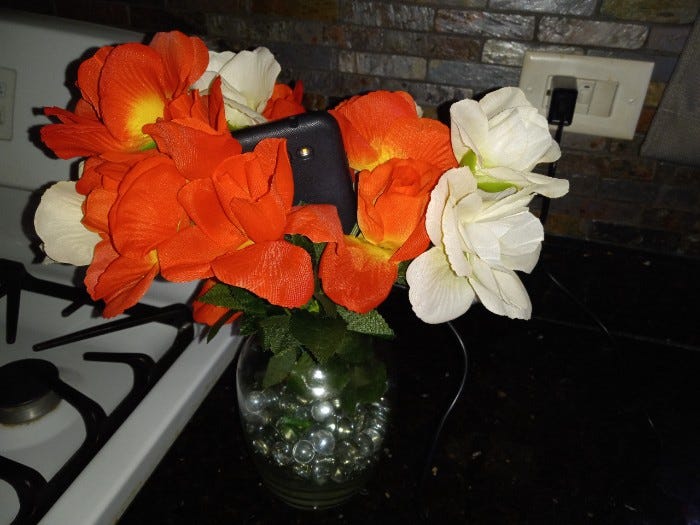
Just plop a phone somewhere stationary enough to be able to balance the weight of the phone. In my case, two flower vases did the trick. (And because the flowers are fake, I can bend, turn and twist the flowers around the phone exactly as I want — to both decorate and hide the camera.)
ADVERTISEMENT ~ Amazon
As an Amazon affiliate, I earn a percentage for every purchase with my referral link.

Can you view multiple rooms on free smartphone surveillance apps?
If you have more than one smartphone with AlfredCamera, you can also set up additional smartphone surveillance cameras in other areas of your home — all from that one account. However, you cannot view multiple live feeds at once on a smartphone, although you can open each “Camera” mode smartphone in separate windows/tabs on a laptop. (Other video surveillance apps may have that multi-view option. This is the biggest perk of a traditional security camera set.)
As much as I hate to give the fence thief credit, in a strange sort of way, I almost have to thank him for the antics. Had he not snatched the fence pieces by my kitchen window, I would’ve never looked at those two vases for so long. I wouldn’t have noticed how much certain areas of our building have no surveillance footage. And those phones would’ve still been in my closet or an ecoATM, not doing me much good. That one prank set off a chain of events and saved me a couple hundred dollars on security cameras in the process.
Is AlfredCamera mobile app worth paying for?
I used the free mobile app options for an entire 30 days to decide whether I wanted to buy a traditional surveillance camera set. When I first moved into my condo, I kept hearing negative comments about the dangers of living on the first floor. Coincidentally, I lived in a first-floor apartment rental for eight years and loved it. It was easier to bring in groceries, laundry, furniture, etc. The millisecond I bought my place, I removed the bars off of the windows. (I have no desire to live in prison nor do I want to feel like I am, but I fully understand why they were installed onto an empty unit. This helps to avoid squatters.)
Recommended Read: “Nationwide battle between squatters and property owners ~ Virginia home sold for $805K with squatters living in the basement”
I went as far as ordering a security set, but then I canceled the order. The price of one camera matched the entire year with AlfredCamera, and I strategically placed unused smartphones and a tablet all over my unit, including making one a pet camera to keep my dog from putting a permanent dent on the top of my couch.
ADVERTISEMENT ~ Amazon
As an Amazon affiliate, I earn a percentage for every purchase with my referral link.

How to balance smartphones for AlfredCamera viewing
The one downside of using smartphones for surveillance footage is it can get awkward for windows with narrow windowsills. Flower pots or stands will either leave you with open blinds or you’ll have to lean the smartphone against something. My alternative method was to use the vines of fake flowers to wrap them around the smartphone, making the placement a little more subtle — if I couldn’t just stick the phone in a vase.
If it makes more sense to aim the phone in a particular direction, the paid option also has a “Rotate” feature, along with a “Flashlight,” “Low Light” and “Siren” feature if need be — on each individual smartphone.
How to control the lighting on smartphones for AlfredCamera viewing
In areas of the home where the outside is darker (like under decks and stairs), it may make more sense to record all motion. But the paid version allows users to only record people, which immediately comes in handy to avoid a bunch of images of grass and moving cars. There’s also an option to record at certain times of the day. With the free version and no HD, everything was pitch black on all smartphones if I didn’t turn on a backlight, so the app proved useless after 8:30ish in the evening.
But with the HD version, the images turn black and white, and the night vision is remarkably clear. It also auto-switches to recording all movement again to avoid missing something. When the sun rises and the light is back to normal, it switches back to only recording people.
Even after this guy complained about my cameras, all while having three cameras on his deck and one to monitor the front yard, and stood around taking photographs of the one traditional camera on our deck, there’s nothing he can do about cameras inside my home. If you live in a multi-unit where you cannot control outdoor cameras, AlfredCamera or something similar to it is a great, economical alternative. It is a useful option as a pet camera, and it can deter unwanted visitors who will quickly figure out that that smartphone on the windowsill isn’t there by accident.
Did you enjoy this post? You’re also welcome to check out my Substack columns “AAC-PACK,” “Black Girl In a Doggone World,” “BlackTechLogy,” “Homegrown Tales,” “I Do See Color,” “One Black Woman’s Vote” and “Window Shopping” too. Subscribe to this newsletter for the monthly posts on the third Friday. Thanks for reading!